
A homepage works like a conversation. A new visitor arrives with questions, and they ask them in a predictable order. When your page answers them in that order, people keep scrolling. When it doesn’t, they leave, even if every section on the page is well written.
Most practitioner sites I review have good content. It’s just arranged in the order the practitioner thinks about their business, not the order a visitor thinks about their problem.
The Questions Visitors Ask, in Order
Think about the last time you landed on a website looking for help with something. You probably wondered: Am I in the right place? Do they understand my situation? Who are they? What would working with them look like? Has it worked for people like me? What do I do next?
Your homepage should follow that same path, one section per question.
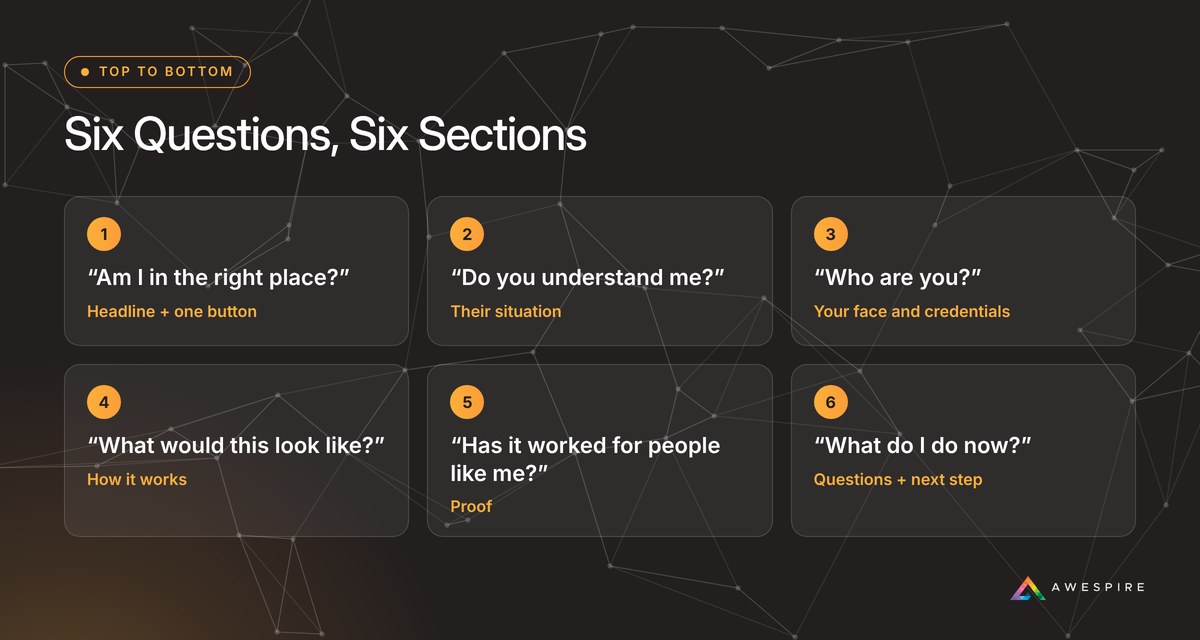
The Six Sections, Top to Bottom
1. The Headline: Am I in the Right Place?
Who you help, what changes for them, and one button. Skip the rotating slider. Most visitors never see past the first slide, and it pushes the one thing you want them to do out of view.
2. Their Situation: Do You Understand Me?
Describe what life looks like for your ideal client right now, in the words they’d use. Tired of being told their labs are normal. Juggling five supplements with no plan. This is where people decide you get it.
3. You: Who Are You?
A real photo, your name, your credentials, and how long you’ve been in practice. Keep it short and keep it high on the page. Health decisions are personal, and people want to see who they’d be working with. Save the full story for your About page.
4. How It Works: What Would This Look Like?
Three or four plain steps from first contact to results. Specifics lower anxiety: how long it takes, what’s included, and what they’ll need to do.
5. Proof: Has It Worked for People Like Me?
Reviews in your clients’ own words, ideally specific ones. Place them near the moment someone is deciding, close to your pricing or your main button, not on a separate testimonials page few people visit.
6. Questions and the Next Step: What Do I Do Now?
Answer the two or three hesitations you hear most on discovery calls (cost, insurance, time commitment, whether you work remotely). Then repeat the same single button from the top of the page.
Fix your homepage from the top down. A great reviews section can’t rescue a headline nobody understands.
Where to Start If Yours Is Out of Order
Don’t rebuild. Walk down the six sections and stop at the first one that’s missing or weak. Fix that one, then move to the next. In most cases the first fix is in sections one through three, and it’s a writing change, not a design change.
5 Common Homepage Mistakes
- A slider at the top. It splits attention and hides your main message behind animation.
- Your bio comes first. People need to know you can help before they care about your background.
- Too many buttons. Book, shop, subscribe, and download, all in the first screen. Pick one.
- Reviews hidden on their own page. Proof works best right where people hesitate.
- No hint of what working together involves. If people can’t picture the process, they won’t start it.
Want to know which section of your homepage to fix first?

I’ve spent more than 22 years building websites for health practitioners and wellness brands. Some of the biggest jumps in new inquiries I’ve seen came from changes that took an afternoon: a clearer headline, one obvious button, a real photo. A redesign can be the right call, but it works best after you know exactly what the page needs to say.
If you’d like a fresh read on your homepage, send me the link. I’ll tell you what’s working, what I’d fix first, and the simplest way to do it.