
If you run a practice, a supplement brand, or a wellness business, your website is the front door to almost everything: bookings, product sales, new patient inquiries, your reputation. So here’s the uncomfortable news from this week. Websites that were fully up to date still got hacked.
Between October 18 and 19, 2026, attackers planted hidden backdoors on WordPress sites running UpdraftPlus, one of the most widely used backup plugins on the platform. They didn’t need an outdated plugin or a weak password to get in.

What Happened
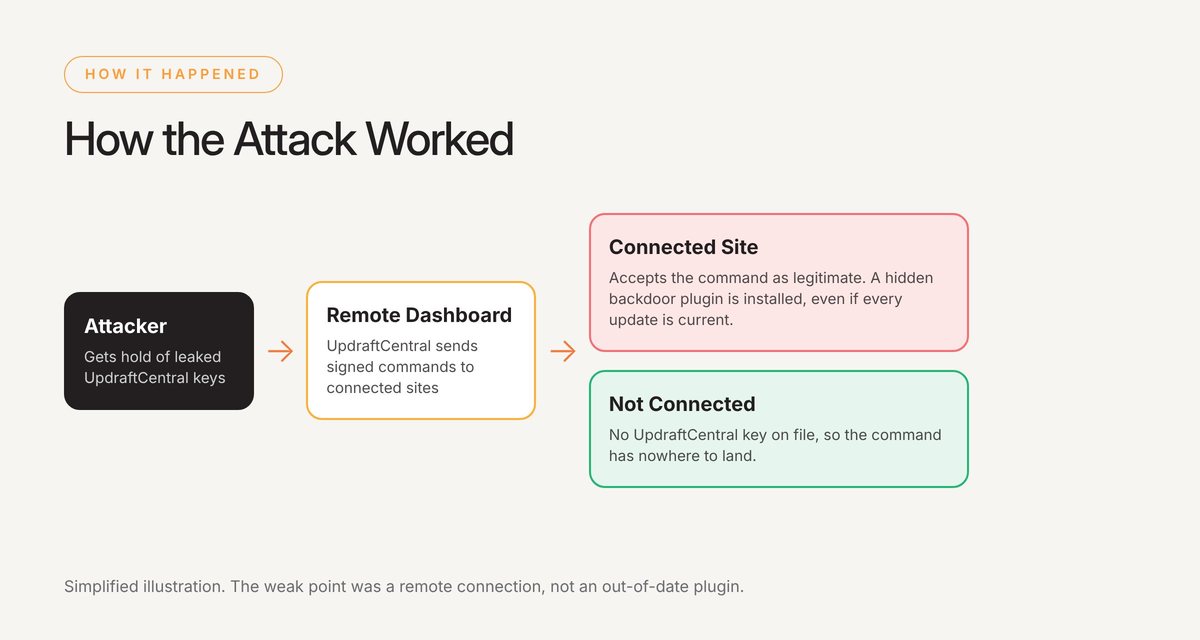
UpdraftPlus includes a feature called UpdraftCentral, a remote dashboard for managing backups across several sites from one place. To make that work, each connected site stores a key that tells it which remote commands to trust.
According to security researchers at Nethemba and Patchstack, an attacker got hold of UpdraftCentral keys and used them to send commands that looked completely legitimate. Connected sites accepted those commands and quietly installed a hidden plugin that gave the attacker a way back in whenever they wanted.
That’s what makes this one different. There was no missed update to blame. The weak point was a remote connection that many site owners had forgotten they ever turned on. At the time of writing, the plugin’s developer had not released a fix.
How We Handled It for Our Clients
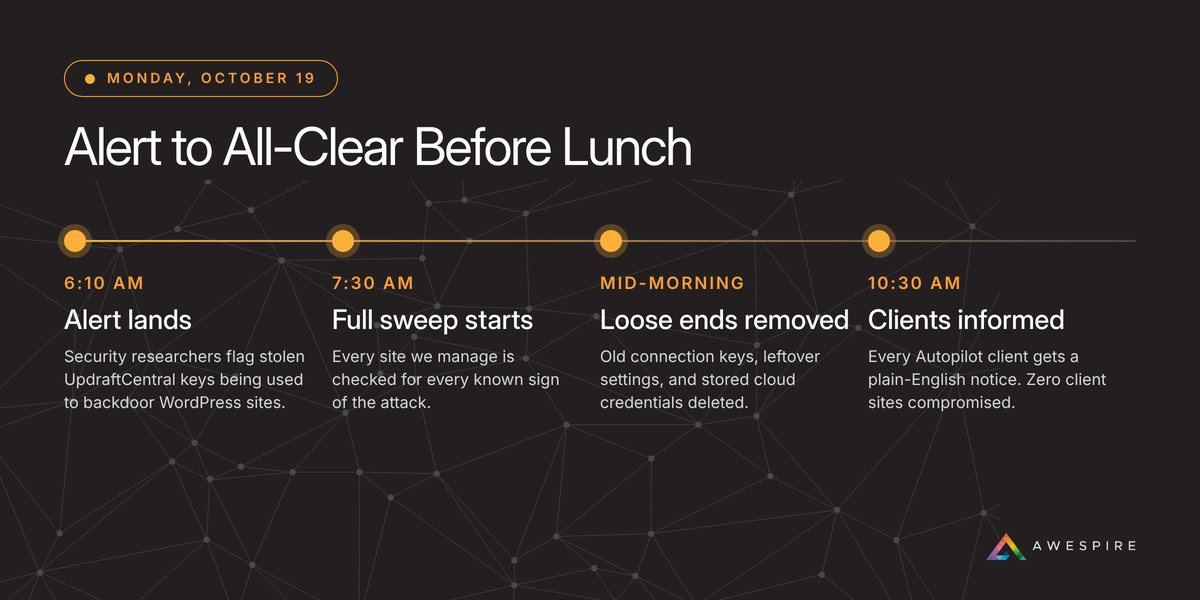
The alert reached me early Monday morning. By 7:30 we were checking every site we manage for every known sign of this attack: unfamiliar plugins, hidden admin accounts, suspicious remote commands, and leftover files.
The result: none of our clients’ sites were compromised.
The sweep still turned up things worth fixing. We found old UpdraftCentral connection keys left behind from years ago, leftover settings on sites where the plugin had long since been removed (including saved logins for old cloud backup accounts), and a few traces from older, unrelated issues. All of it was cleaned up the same morning, and every Autopilot client had a plain-English update in their inbox before lunch.

Why This Should Change How You Think About Security
Updates alone aren’t a security plan
Keeping plugins and WordPress current still matters. But this attack went straight around it, and the next one might too.
Forgotten connections are real risks
Plugins you deactivated, integrations someone set up once, an admin account for a developer who left years ago. None of it shows up on your homepage, and any of it can become a way in.
AI is speeding everything up
Attackers now use AI tools to find weaknesses, write attack code, and scan thousands of sites far faster than they could even a year ago. The gap between a flaw being discovered and that flaw being used against real websites keeps shrinking. Waiting for next month’s maintenance window isn’t fast enough anymore.
Someone has to be watching
When something like this breaks overnight, the question that matters is who notices, and how quickly they act.
5 Checks to Run on Your Site Today
- Is UpdraftPlus connected to UpdraftCentral? In WordPress, go to Settings, then UpdraftPlus, then Advanced Tools, then UpdraftCentral. Remove any keys you aren’t actively using.
- Any plugins you don’t recognize? Pay extra attention to anything installed recently that no one on your team added.
- Any admin accounts you didn’t create? Every administrator should be a person you can name. Downgrade or remove the rest.
- Old plugins or connections still hanging around? Deactivated isn’t the same as gone. Delete what you don’t use, and disconnect old apps from your Dropbox or Google Drive account.
- Is someone checking your site every day? Updates, backups, monitoring, and a person who acts the same day when something breaks.
If any of that sounds unfamiliar, that’s okay. It’s exactly the kind of thing your web team should be able to answer in a few minutes.
I’ve spent more than 22 years building and marketing WordPress websites, and I see the same pattern again and again. Security feels like an optional expense right up until the day a site gets hacked. Then it becomes one of the most expensive problems a business can have: lost bookings and sales, a domain flagged by Google, an emergency cleanup bill, and a hit to your reputation that’s hard to measure and harder to repair.
Awespire Autopilot exists so you never have to learn that lesson the hard way. Managed updates, daily backups, firewall protection, vulnerability patching, 24/7 monitoring, and a real person on call who acts the same day something goes wrong. Days like this Monday are exactly what it’s for.